A visual schedule for adults with disabilities can make daily routines easier to understand, follow, and complete. Instead of relying only on spoken reminders, a visual schedule shows what will happen, in what order, and when an activity is finished.
Visual schedules are not just for children. When they are designed with age-respectful images, meaningful choices, and the adult’s own goals in mind, they can support communication, participation, and greater independence at home and in the community.
This guide explains how families and support teams can create a practical visual schedule for an adult with an intellectual or developmental disability. It also includes examples for morning routines, meals, appointments, community outings, and adult day programs.
What Is a Visual Schedule?
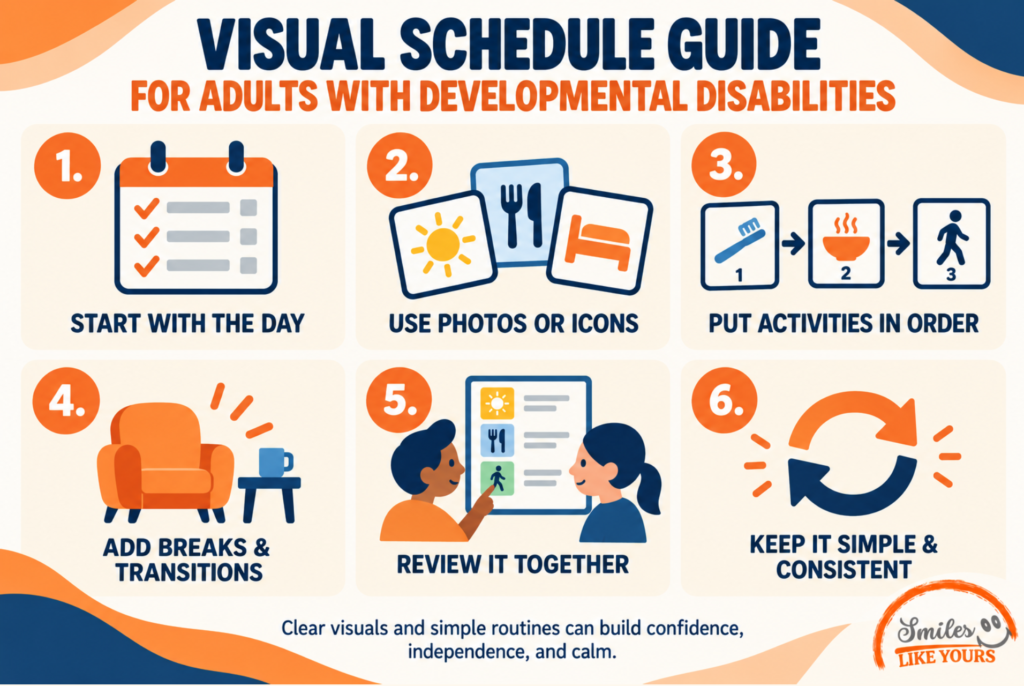
A visual schedule is a sequence of pictures, symbols, written words, photographs, or objects that represents activities or steps. It answers questions such as:
- What am I doing now?
- What comes next?
- How many steps are left?
- When will the activity be finished?
- When will I get to do something I enjoy?
A schedule may show an entire day, one part of the day, or the steps within a single task. For example, a daily schedule might include breakfast, transportation, an adult day program, lunch, a community outing, and time at home. A task schedule might show the individual steps for preparing a snack or doing laundry.
The University of Cincinnati Center for Excellence in Developmental Disabilities provides visual schedule protocols, templates, and examples designed to support people with intellectual and developmental disabilities.
How Visual Schedules Can Support Adults with Developmental Disabilities
Many daily activities involve remembering instructions, organizing several steps, managing transitions, and understanding time. A visual schedule makes some of that information visible and available for review.
Depending on the person and how the schedule is introduced, it may help:
- Create a more predictable daily routine;
- Clarify what is expected during an activity;
- Support transitions between places or tasks;
- Reduce the need for repeated verbal reminders;
- Encourage participation in daily living tasks;
- Make choices easier to understand;
- Support communication between the adult, family, and staff;
- Build confidence through successful completion of routines.
Visual supports should not be used to control every part of a person’s day. The adult should have opportunities to choose activities, request changes, take breaks, and participate in creating the schedule.
Types of Visual Schedules for Adults
There is no single format that works for everyone. The best visual schedule is the one the person can understand and is willing to use.
Photograph schedules
Real photographs can be helpful when an individual recognizes familiar people, places, and objects more easily than drawings. Families might use photos of the person’s actual bathroom, transportation vehicle, day program, workplace, or favorite community location.
Picture or symbol schedules
Simple icons can represent meals, medication, exercise, shopping, appointments, and other recurring activities. Keep the visual style consistent and make sure each symbol has a clear meaning for the person using it.
Written checklists
Some adults prefer a straightforward written list. A checklist can include boxes to mark when each activity is complete. Written schedules should use familiar words, readable type, and short instructions.
Object schedules
For someone who does not understand photographs or symbols, an object may communicate what comes next. A reusable shopping bag might represent a grocery trip, for example, while a towel could indicate shower time.
Digital schedules
A phone or tablet can display photos, reminders, timers, and step-by-step instructions. Digital tools may be convenient, but a paper or object-based backup is useful when a device is unavailable, uncharged, or distracting.
How to Create a Visual Schedule for an Adult
1. Begin with the adult’s goals
Start by identifying what the person wants to do with greater confidence or independence. The goal might be preparing breakfast, getting ready for an adult day program, completing a household task, or knowing what to expect during a community outing.
Ask the adult what format they prefer and which words, photographs, or symbols make sense to them. When possible, create the schedule together.
2. Choose one routine
Do not begin by scheduling every hour of the week. Select one routine that is useful, repeated regularly, and short enough to practice. A morning routine or simple meal-preparation task is often easier to test than a full-day schedule.
3. Observe the routine from beginning to end
Write down each important step. Include only the information needed to complete the activity safely and successfully. Too many details can make the schedule difficult to follow, while missing steps can create confusion.
4. Select an age-respectful format
Use real photographs, simple icons, or written instructions that reflect the person’s age, preferences, culture, and communication style. Avoid childish illustrations unless the adult specifically likes and chooses them.
5. Show what is finished
Build in a clear way to mark completion. The person might check a box, move a picture into a “finished” pocket, cross out a step, or swipe to the next item on a device.
6. Teach the schedule
Simply placing a schedule on the wall may not be enough. Review it when the person is calm, demonstrate how to check each step, and provide the amount of prompting they need. Give the adult time to process the information before repeating a direction.
7. Reduce support gradually when appropriate
As the routine becomes familiar, the support person may be able to step back. The goal is not to remove help before the person is ready. It is to provide the level of assistance that supports success while preserving choice and dignity.
8. Review and update it
Interests, abilities, health needs, transportation, and weekly plans can change. Ask whether the schedule is still helpful. Replace confusing images, adjust the number of steps, and add more choice when appropriate.
Example: Morning Visual Schedule
- Use the bathroom;
- Brush teeth;
- Choose clothes and get dressed;
- Prepare or eat breakfast;
- Take scheduled medication with the appropriate support;
- Pack personal items;
- Check the day’s plan;
- Get ready for transportation.
This example should be personalized. Some adults will complete these tasks independently, while others may need reminders, adaptive equipment, or direct assistance. Health and medication routines should always follow the individual’s authorized plan and professional guidance.

Example: Community Outing Schedule
- Review where the group is going;
- Choose what to bring;
- Travel to the location;
- Review expectations and available choices;
- Participate in the activity;
- Take a break if needed;
- Return to the center or home;
- Talk about what was enjoyable or difficult.
The schedule can also show useful information such as how long the outing may last, where a quiet space is available, who will provide support, and what will happen if the plan changes.
Example: Simple Meal-Preparation Schedule
- Wash hands;
- Gather ingredients and utensils;
- Follow the recipe steps;
- Use appliances with the appropriate level of support;
- Serve the food;
- Put ingredients away;
- Clean the work area.
A visual recipe can combine photographs, measurements, safety reminders, and checkboxes. The schedule should reflect the person’s abilities and any dietary, allergy, or safety requirements.
Common Mistakes to Avoid
Creating the schedule without the adult
A schedule is more person-centered when the adult helps choose the goals, activities, images, and format. It should represent the person’s life, not only the convenience of the support team.
Using too many steps
A crowded page can be overwhelming. Begin with the essential steps and divide longer routines into smaller sections when needed.
Using unclear or childish images
Each image should be recognizable to the person using it. Select adult-appropriate visuals and test their meaning instead of assuming every symbol will be understood.
Changing the words or symbols too often
Consistency helps a person learn what a visual means. If families, residential staff, and day support professionals use different terms for the same activity, discuss whether a shared approach would be helpful.
Treating the schedule as inflexible
Real life changes. Include a symbol for “change,” “later,” or “choose another activity.” Explain changes in a calm and accessible way, and allow time for questions or processing.
Doing too much too quickly
Introduce one schedule, practice it, and observe what happens. Success is more important than creating an elaborate system.
How Families and Support Teams Can Work Together
A visual schedule may be used across home, transportation, day services, work, and community settings. Coordination can make the tool more useful without removing the adult’s privacy or control.
Helpful questions include:
- Which format does the person understand best?
- Which routines does the adult want help organizing?
- How does the person indicate that they want a break or change?
- What level of prompting is helpful?
- Which words and symbols should remain consistent?
- How will the adult participate in reviewing the schedule?
- What information should stay private?
According to Rutgers University’s guidance on visual supports, visual cues can be used with youth and adults to make tasks and information more concrete. The most useful approach remains individualized: a tool that helps one person may need to be simplified, expanded, or replaced for someone else.
Visual Schedules in Adult Day Support
Structured programs can provide many opportunities to practice using schedules in real situations. At Smiles Like Yours, Adult Day Support includes social activities, life skills, recreation, community outings, and a supportive daily structure for adults with developmental disabilities.
A visual schedule may help a participant preview the day, prepare for transitions, make choices between activities, and understand what comes before or after a community outing. Any tool should be adapted to the participant’s goals, communication preferences, and support plan.
Families exploring day, community, or residential support can review the full range of Smiles Like Yours services.
Frequently Asked Questions
Are visual schedules only for autistic children?
No. Visual schedules can be used by adults with different communication, learning, memory, or organizational support needs. The format and content should be appropriate for the individual adult.
Does a visual schedule need to use pictures?
No. It may use photographs, icons, written words, objects, checklists, or a combination. The best choice is the format the person understands and prefers.
Can a visual schedule support independence?
It may support independence by making steps and expectations easier to review without repeated verbal directions. Results depend on the person, the task, the teaching process, and the support available.
What if the adult does not want to use the schedule?
Ask why. The schedule may be confusing, too detailed, inconvenient, childish, or focused on goals the person did not choose. Try another format and involve the adult in deciding what would actually be useful.
How many activities should be included?
Begin with a manageable number. Some people prefer a full-day overview, while others benefit from seeing only the current activity and what comes next.
A Useful Schedule Starts with the Person
A successful visual schedule for adults with disabilities is clear, respectful, flexible, and personally meaningful. It should help the adult understand and influence their day—not simply follow instructions created by someone else.
Start with one routine, choose an accessible format, practice together, and adjust based on the person’s feedback. Small improvements in clarity and participation can make everyday experiences feel more predictable and manageable.
If your family is exploring structured day support, life-skills opportunities, or community participation in Richmond and surrounding Central Virginia communities, schedule a tour or begin the referral process with Smiles Like Yours. Our team is ready to learn about your loved one’s goals, interests, routines, and preferred type of support.